Network Configuration
Network Configuration
This guide outlines how the network topology is structured within the ProxLink homelab infrastructure, which is powered by Proxmox VE, OPNsense, NetBird, Technitium DNS, and Splunk.
Overview
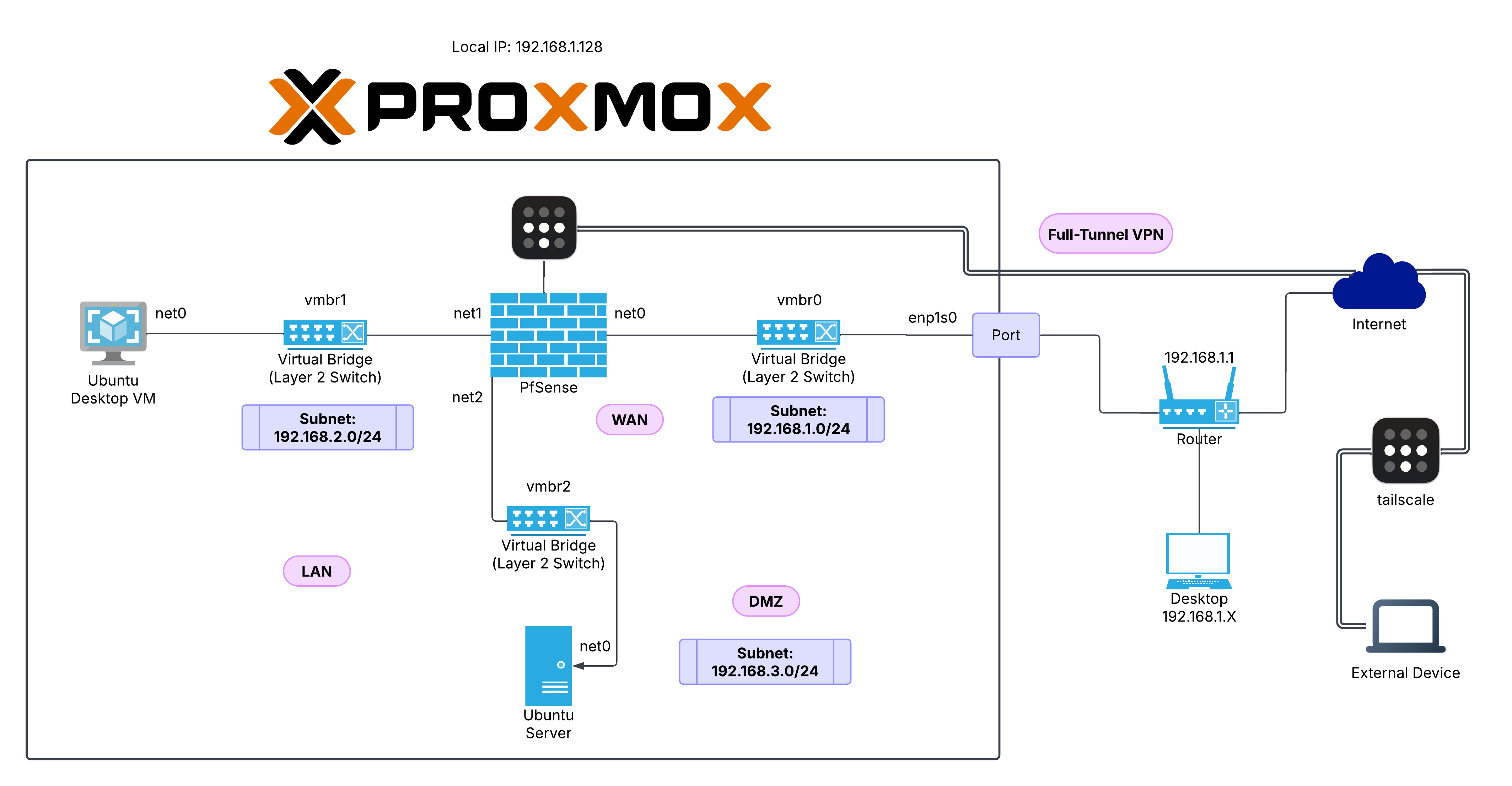
ProxLink uses a virtualized network architecture segmented into three main subnets:
- WAN: 192.168.1.0/24
- LAN: 192.168.2.0/24
- DMZ: 192.168.3.0/24
An OPNsense virtual firewall routes and filters traffic between these networks, enabling secure connectivity, isolation, and remote VPN access.
Topology Components
Proxmox VE Host
- Acts as the virtualization platform.
- Provides virtual bridges (
vmbr0,vmbr1,vmbr2) to connect VMs to OPNsense and the physical network.
Virtual Bridges (vmbr)
- vmbr0 – WAN bridge connected to the router (
192.168.1.0/24) - vmbr1 – LAN bridge for internal VMs (
192.168.2.0/24) - vmbr2 – DMZ bridge for exposed services (
192.168.3.0/24)
OPNsense Firewall (VM)
- Interfaces:
- net0 (WAN): Connected to
vmbr0 - net1 (LAN): Connected to
vmbr1 - net2 (DMZ): Connected to
vmbr2
- net0 (WAN): Connected to
- Handles routing between networks, NAT, firewall rules, and DHCP.
Internal VMs
- Ubuntu Desktop VM
- Connected to LAN via
vmbr1
- Connected to LAN via
- Ubuntu Server
- Connected to DMZ via
vmbr2
- Connected to DMZ via
External Network
Router
- Default Gateway:
192.168.1.1 - Provides internet access for the Proxmox host and OPNsense WAN interface.
External Access
- Devices on the
192.168.1.0/24subnet can access the OPNsense WAN. - NetBird provides VPN access, enabling remote access to internal services securely over the internet.
VPN Integration (NetBird)
- A NetBird routing peer exposes the internal subnets to authorized remote peers.
- Ensures encrypted remote access to LAN and DMZ resources, subject to OPNsense firewall rules.
Supporting Services
- Technitium DNS resolves internal hostnames and filters malicious domains for the LAN and DMZ.
- Splunk collects logs from OPNsense, Technitium DNS, NetBird, and the VMs.
Subnet Breakdown
| Network | Subnet | Purpose | Bridge | Devices |
|---|---|---|---|---|
| WAN | 192.168.1.0/24 | External access to Internet | vmbr0 | OPNsense (WAN), Router, Proxmox |
| LAN | 192.168.2.0/24 | Internal/Trusted VM network | vmbr1 | Ubuntu Desktop VM |
| DMZ | 192.168.3.0/24 | Semi-trusted services | vmbr2 | Ubuntu Server |